Instruction for using this site / CD
Click the Back Button of your browser or here to return to the tour
The background music can be stopped by clicking the pause button on the embedded media player.
If you don't have the appropriate audio plug-in and were not prompted to download it, go the the Quick Time web site and download and install the appropriate plug-in.
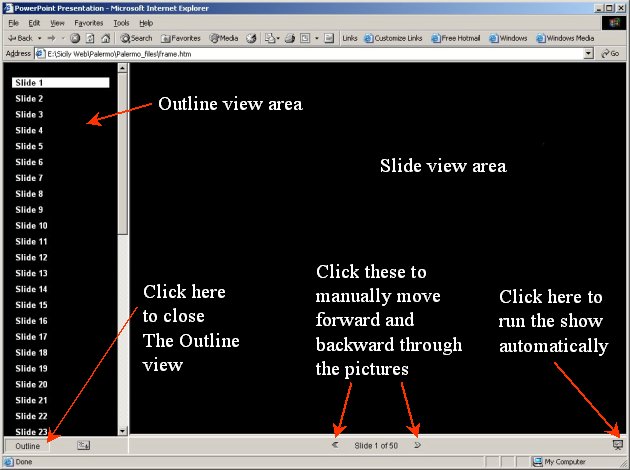
When you click on the city you want to visit the pictures will be opened in a new window. You can navigate the pictures manually by clicking the forward / backward arrows at the bottom of the viewing window or clicking the slide number in the outline view area. To run the show automatically, click the 'Full Screen Slide Show' button in the lower right corner of the screen. A screen shot is shown to identify the navigation controls.
After all the slides in a show have been viewed a slide will appear prompting you that the tour of that city is complete, simply follow the instructions on that slide to return to the Tour Menu.
To stop an automatic slide show press the Esc key on your keyboard. Then close the slide view window to return to the Tour Menu.
If you want to view the pictures in a picture browser they are stored in JPG format in a folder on the CD named: Pictures JPG
If you want to listen to the music of the CD, the music is stored in 128Kbit/sec. MP3 format in a folder on the CD named: Music MP3. The music is copy written and can only be used for home use and cannot be sold or performed in public for admission. For music credits click here.